Kling AI: what it does and whether it's worth it
Kling AI is one of the most capable AI video and image generation platforms available right now. Here's what it actually does, how the models stack up, and how the pricing breaks down.
Kling AI: what it does and whether it's worth it
Affiliate link. We may earn a commission at no extra cost to you.
When Kling AI opened to international users, the AI video generation space started paying attention. The quality was genuinely different from what was available at the time: noticeably better in motion fluency and prompt adherence. Since then, the platform has moved fast. Multiple model generations, a full image suite, audio generation, a canvas agent, and pricing that scales from free to serious production use.
We’ve been watching this tool closely for client work because the output quality and control surface are real enough to change production workflows. Here’s a practical breakdown of what it does, what the current models actually deliver, and how the pricing breaks down for a team that needs to generate video at scale.
What Kling AI does
Kling AI is an AI creative studio built around video and image generation. The platform lives at kling.ai and operates as a web app (with a mobile app also available). It is not a desktop client or plugin; you work inside the browser or on mobile.
The core product is video generation from text or images, but the toolset has expanded well beyond that. The full suite today includes text-to-video, image-to-video, motion control, lip sync, digital humans, video extension, image generation (text-to-image), image restyle, inpaint, image expansion, virtual model, AI outfit, text-to-audio, and video-to-audio. There is also Omni (a multimodal input mode) and Kling Canvas (an agent-based workflow tool).
That is a lot of surface area. Not all of it is equally polished, but the breadth is real and it keeps growing.
Start with Kling AI’s free tier to test the current models on your use case.
Which Kling AI model should you use?
As of May 2026, the Kling AI model series includes four current 3.0-generation entries, plus two earlier models still available in the generation interface.
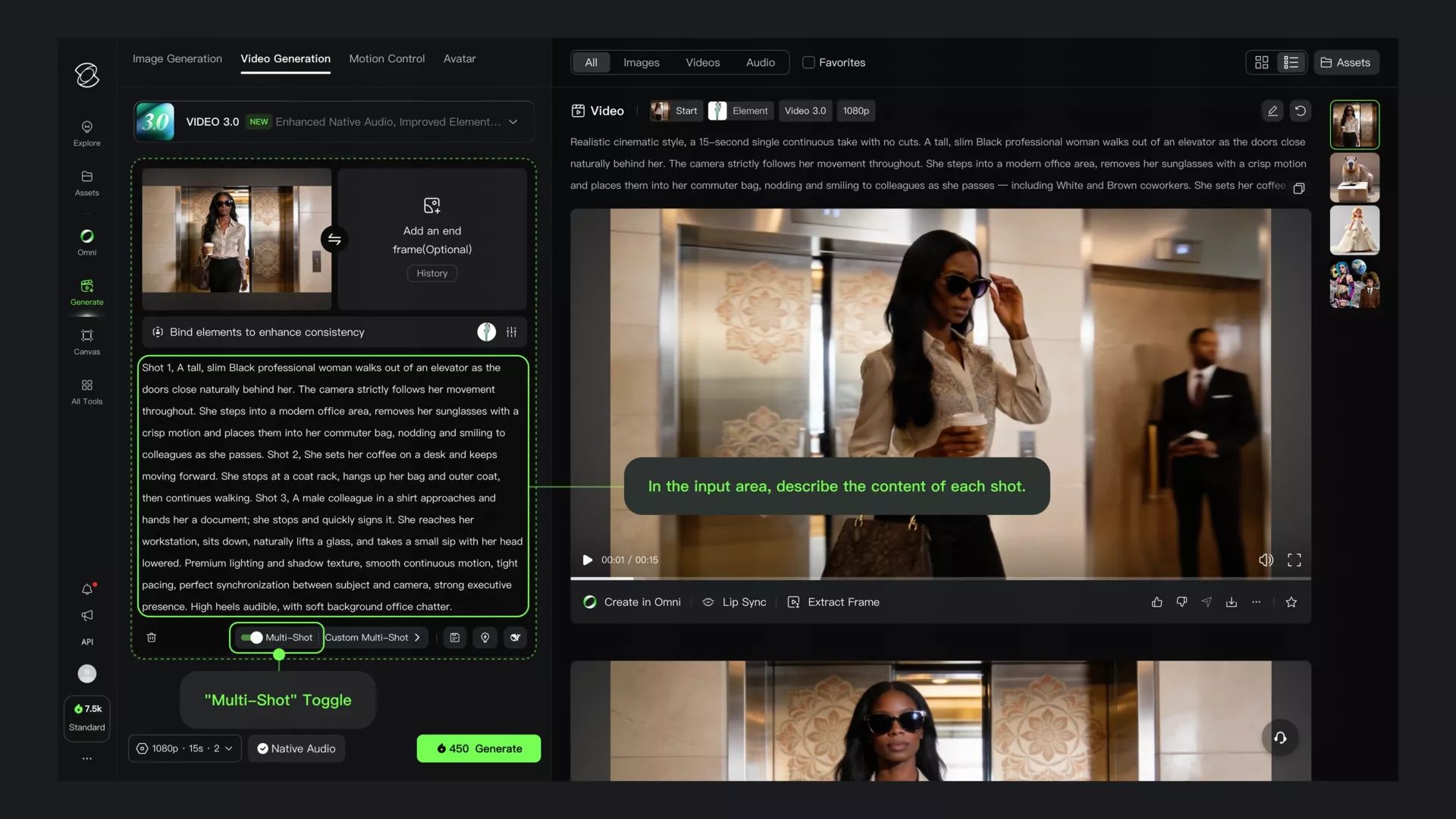
VIDEO 3.0 is the flagship video model, offering enhanced native audio, improved element consistency, and multi-shot storytelling support. Multi-shot is the standout feature here: VIDEO 3.0 lets you define shot-level parameters (duration, framing, camera movement, narrative intent) and generate a structured multi-shot sequence in a single pass. That is a materially different workflow from iterating on single clips.
VIDEO 3.0 Omni extends that with full multimodal input. It accepts text, image, audio, and video references simultaneously and adds voice-driven characters with native audio output. In plain terms: you can throw more reference material at it and expect it to actually incorporate all of it.
IMAGE 3.0 Omni is the top-tier image model, targeting professional workflows. It outputs natively at 2K and 4K, with enhanced narrative expression and image series generation - making it a strong fit for storyboard and concept art pipelines.
IMAGE 3.0 is the standard image model with enhanced consistency and multi-reference support.
VIDEO 2.6 (Voice Control) and VIDEO O1 (Element AI Multi-Shot) are the previous-generation video models, both still accessible from the generation interface. VIDEO O1 gives all subscribers three free uses per day.
Does motion control actually matter?
Motion control is one of Kling’s differentiators versus more basic generators. Rather than describing motion entirely through text prompts, you can apply specific camera movement controls and reference-based motion to guide how a scene moves. It appears in the main navigation as a distinct workflow, separate from video generation.
In practice, this matters most when you need consistent results across multiple clips (a camera pull-back, a tracking shot, a specific pan angle). Without it, you’re negotiating with a text prompt and hoping. With it, you have an actual control surface.
Can Kling generate talking-head video?
Kling’s lip sync tool generates or animates characters speaking to match audio, with prompt guidance for speaking and singing content across multiple languages, dialects, and accents. The digital human and Avatar 2.0 tools are listed separately in the tools menu, with Avatar 2.0 being the more recent iteration for character animation.
These tools are relevant for talking-head content, product explainers, or social video without on-camera talent. For the right content type at the right resolution, this is a viable production shortcut (though we’re not overstating what AI lip sync can accomplish today).
What’s the maximum video length?
Video extension is a subscriber feature that lets you extend generated clips incrementally, up to a three-minute maximum total. It’s not available to free users.
For anyone planning longer-form content, that three-minute ceiling is a real constraint. Kling is oriented around short-form output, and if you need continuous footage beyond that, you’ll need to stitch clips together manually.
What resolution does Kling generate at?
The default generation resolution is 720p. Paid subscribers unlock 1080p video generation at every tier above free, with 4K access noted for subscribers. IMAGE 3.0 Omni outputs natively at 2K and 4K. When not logged in, the interface defaults to 720p and 16:9; higher resolution and aspect ratio flexibility are subscriber-only features.
For production work, 1080p is the practical floor. If footage ends up in a real edit, 720p is too soft for anything beyond social thumbnails or rough animatics.
What does Kling AI cost?
Kling AI uses a credit system, with different tools costing different amounts per generation. The membership page lists five individual tiers:
| Plan | Monthly price | Monthly credits |
|---|---|---|
| Basic | $0 | Daily free credits only |
| Standard | $6.99 | 660 |
| Pro | $25.99 | 3,000 |
| Premier | $64.99 | 8,000 |
| Ultra | $127.99 | 26,000 |
Free tier constraints: The Basic plan does not include a monthly credit allocation. You get access to “element creation” (30 vs. 50 on paid tiers) and daily free credits, but it’s genuinely limited. Output is capped at 720p with no video extension and no commercial use rights.
Cost per generation: The Standard plan at $6.99 works out to roughly $1.33 per 100 credits. Pro drops that to $1.09 per 100. Ultra reaches $0.62 per 100, reflecting volume discounts. The pricing page also notes first-subscription discounts and annual billing options; Standard’s annual renewal is listed at $8.80/month with a 12% discount.
Commercial licensing: All paid plans include commercial use rights. The free tier does not, which matters if you’re building anything client-facing.
Business plans are listed separately on the membership page but are less relevant for most teams evaluating the tool.
Is Kling worth it for your team?
The practical calculus comes down to: what is the output actually replacing, and at what volume?
For social content teams generating high volumes of short video assets (explainers, product demos, campaign variations), the Pro tier at $25.99/month with 3,000 credits is a realistic starting point. For teams doing occasional concept video or storyboarding, Standard at $6.99 is enough to evaluate the tool properly.
Kling is less of a fit where output needs to hold up at scale against real camera footage. The models are impressive, but AI video still reads as AI video to a careful eye. The right framing is not “replace production” but “expand what a small team can produce without expanding the budget.”
The multi-shot control in VIDEO 3.0 is the standout feature from a production standpoint. Being able to define shot structure at the prompt level, rather than assembling clips one at a time, meaningfully changes the time cost of getting from concept to rough cut.
Start with Kling AI’s free tier to test how the current models handle your specific use case.
Bottom line
Kling AI is a serious tool. The model progression from 1.x to 3.0 has been fast, the feature set is now genuinely broad, and the pricing is structured well enough that a small team can get meaningful value without a large commitment.
The areas to watch: credit costs at high volume can add up faster than tier pricing suggests; video extension caps at three minutes, limiting longer-form work; and the 720p free default means you won’t see real output quality without paying. None of those are dealbreakers. They’re just the actual edges of the product.
For teams where generative video has a real use case, Kling belongs on the shortlist. Start with the free tier to test your specific workflow before committing to a paid plan.
Kling AI: what it does and whether it's worth it
Affiliate link. We may earn a commission at no extra cost to you.